
SUPER BEACH IN ACTION
From player list to final result.
Prepare your beach tennis tournament, run the rounds and follow results in Super Beach. See how the app helps at each stage.
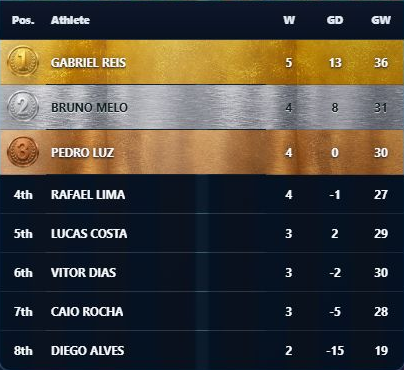
01 · BEFORE TAKING THE COURT
A different group? Start with the format.
Eight people who want to rotate partners need a different schedule from eight ready-made pairs. Compare formats, count participants and choose the structure before entering names.
Then add players, check attendance and set available courts and ranking criteria. Save a draft if you need to finish preparing later. Super 8 Individual is a free way to get started.
02 · WHO PLAYS WITH WHOM
From the player list to the first court call.
Generate the schedule and see partners, opponents and courts together. For formats with byes, check who sits out each round too. With fewer courts, follow the calls shown for your format.
Mar Azul Open begins with an unscored opening round. Matchups are already set; call the players to court. In Mexicano, later rounds are generated after results are entered.
Understand the Mexicano sequence03 · EVERY RESULT COUNTS
Enter scores. Track each player’s progress.
Lucas and Vitor win 6–3. The round records the score and both players now have one win, six games for and a +3 game difference. Partial standings reflect valid results under your chosen criteria.
Other matches are still pending. Partial positions help you follow the competition; check the complete schedule and any ties before announcing final results.
See Super 8 Individual ranking criteria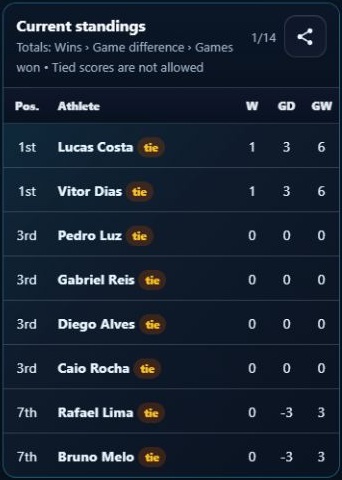
04 · RESULTS TO SHOW
Choose what is useful to share.
Share the current round, standings, partial schedule or podium using free layouts. PRO also lets you share the full schedule, combine images and export CSV or reports. For a report, check the menu label: PDF or Text tells you what will be generated.
In the completed Etapa Sol, the menu shows layouts and identifies those requiring PRO. You choose the material before sharing it.
Compare what is included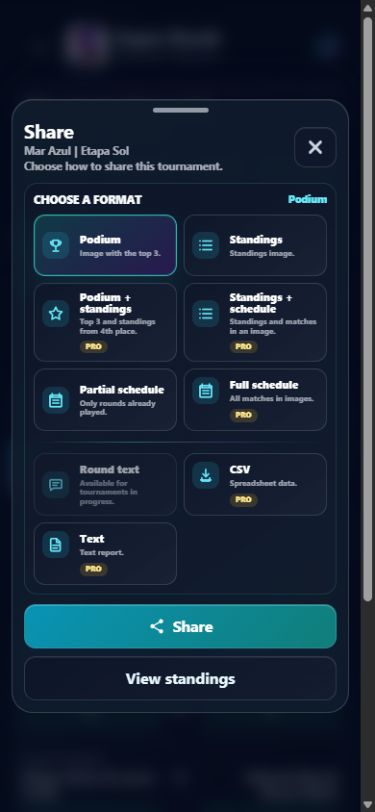
05 · FOR PEOPLE FOLLOWING ALONG
Let people follow from beyond the court.
Open Live Link in the tournament, review its conditions and activate it while connected. Share the address with participants. They follow in a browser; organizing and editing stay in your app.
You can keep entering scores offline. Once connected, check the panel to see whether changes were sent. If Update pending appears, use Link options → Update now. Viewers follow what has been published; editing stays on the organizer’s device.
Learn about Live Link →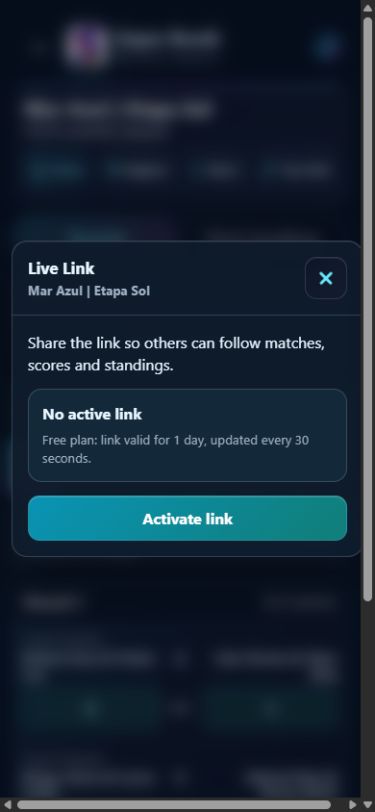
06 · AFTER THE LAST MATCH
Keep the tournament. Keep a backup.
Saved tournaments remain available to view on the device. Create a backup file to keep a copy of your data, and review its contents before confirming a restore. Data backup and restore are included for free. Importing Super 40 as a copy requires PRO; see the restore modes in the guide below.
The app does not back up automatically. Keep the file somewhere safe. Restoring data does not restore a subscription or create synchronization between devices.
Read about backup and restore →One competition can continue into the next session.
Bring compatible tournaments into a Circuit and follow standings across stages.
Start free. Expand when you need to.
Try Super 8 Individual with one active tournament. For more formats, multiple events and advanced tools, compare PRO.


One free tournament in progress at a time. More formats and features are available with PRO.
Available for Android and iOS. Check availability in your device’s app store.