Publish from the app
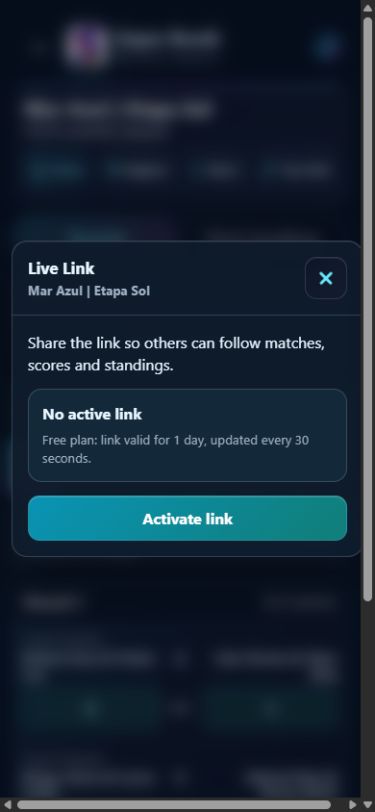
- Open the tournament and choose Live Link from its actions. Review the names and information that will be exposed.
- With an internet connection, choose Activate link when available. Wait for publication to be confirmed.
- Copy or share the address shown in the panel. Open it to check what viewers will see. Do not share the link’s private authorization.
Anyone with the address or code can view, forward or capture the published content. A link is not a private invitation. Avoid adding personal information that is unnecessary for viewing.
Enter scores and check publication
You can organize a local tournament offline. The organizer’s device must be connected to send changes to the viewer. Viewers also need an internet connection to retrieve new information.
- Enter the score in the app. The result becomes part of your local tournament.
- Check publication in the panel. With an active link and a connection, the app attempts to publish changes. Wait for sending to be confirmed.
- Resolve pending updates. If Update pending appears, open Link options → Update now. Check your connection and wait for confirmation before announcing that the score is available.
You can keep entering scores while waiting for changes to be sent. Viewers see them after publication and their browser’s next update check. Editing and control stay in the organizer’s app; opening the link on another device lets people view published information.
What viewers can follow
Open the address you received in a browser. In rounds, view published matches and scores and use the selectors or previous/next controls to browse the schedule. Content depends on the format and what has been published.
For traditional and Mixed tournaments, viewers follow rounds and scores during play. Standings are released when the tournament is published as finished; current standings remain available in the organizer’s app.
For Super 40, the viewer can show groups, matches and bracket progression according to the published phase. Final standings follow the event’s release conditions. For a Circuit, share each tournament’s link; overall standings are viewed in the app.
How long does a link work?
| Access | Public validity | Update checks |
|---|---|---|
| Free | 24 hours | Every 30 seconds |
| PRO | Up to 7 days | Every 10 seconds |
Conditions depend on access when publishing or renewing and the options offered in the panel. Check the expiry shown for that link. These are intervals between update checks. They do not guarantee instant updates, and the organizer needs an internet connection to send changes.
In Link options, use Renew validity when available. To stop access, choose End link and confirm. If ending is not confirmed, retry with a connection; tapping the button alone does not confirm that access has ended.
Under the current policy, expired publications become eligible for deletion after 30 full days from expiry; ended or disabled publications become eligible after seven full days from being ended. Cleanup runs in daily batches: the period marks eligibility and does not guarantee immediate deletion. To request online deletion, contact support with the public code and approximate date; do not send private controls.
See the Privacy Policy too.
Compare free and PRO access →The link did not open. What next?
The page is loading.
Wait for the request and check your connection. If it does not finish, try reopening. A loading screen does not confirm the tournament was published.
The code is incorrect or there is no content.
Check that you copied the complete address without extra punctuation. Ask the organizer to confirm the code and publication. A tournament name is not a substitute for the public code.
Viewing is unavailable.
Check your connection and retry. If it persists, ask the organizer to check the Live Link panel and its message. The organizer can review the local tournament in the app while resolving public access.
The link ended or expired.
Ask the organizer for an updated address. Only the organizer with the corresponding control can renew or end publication through the app. A standard backup does not transfer that control.
The score has not changed on my screen.
Check your connection and wait for the next request. The organizer must have sent the changes. An offline screen may retain the last received information; do not treat it as confirmation of the latest result.
Organizing the next session?
Free Super 8 Individual lets you organize the competition and publish a link for 24 hours. Explore PRO for links lasting up to seven days and more formats. Scores are still entered in the app.