
SUPER BEACH PRO
More formats for your group. More control for organizers.
Run tournaments side by side, choose more formats and connect events through Circuits. Explore PRO plans in the app.
What does your next competition need?
Different groups, more formats.
Keep partners together, run a Mixed Super or organize forty players through groups and brackets. Choose a structure that fits your list.
See all ten formatsMore than one event on your calendar.
Keep multiple tournaments running and bring compatible stages into Circuits, without finishing one event just to start another.
Explore CircuitsMore control over setup and presentation.
With advanced leveling, order players by ability to help balance matchups. To present results, choose the full schedule, combined images or reports. Leveling uses the order you supply, so the outcome also depends on how you assess the group.
See features in actionFree already covers a complete tournament.
Start with Super 8 Individual, one tournament in progress, scores and standings. Viewing your data and making backups remain available without PRO. Compare the operations that change with a subscription.
| Feature or operation | Free | PRO |
|---|---|---|
| Create Super 8 Individual | Included | Included |
| Tournaments in progress | 1 | Multiple at once |
| Create other formats | Requires PRO | Included |
| Super 8 Individual scores and standings | Included | Included |
| View existing tournaments | Included; data is preserved | Included |
| Draw with advanced leveling | Requires PRO | Included; uses your supplied ability order |
| View saved Circuits | Included | Included |
| Create/edit Circuits and count stages | Requires PRO | Included |
| Super 40: view / edit | Viewing available; edits require PRO | Creation and edits included |
| Data backup and restoreImporting Super 40 as a copy requires PRO. See conditions → | Included | Included |
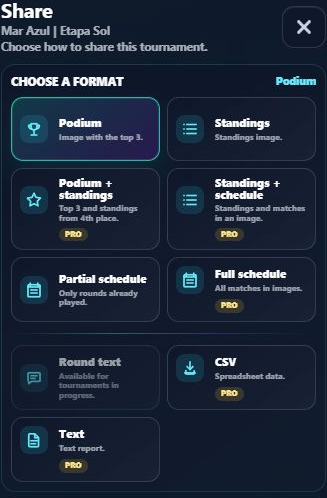
| Current round, standings, partial schedule and podium | Free layouts included | Free + PRO options |
| Full schedule, combined images and CSV | Requires PRO | Included |
| Tournament report | Requires PRO | PDF or Text, as labeled in the menu |
| Organizer, club, sponsor details and special themes | Requires PRO | Included |
| Live Link: public availability | Up to 24 hours | Up to 7 days |
| Live update checks | Every 30 seconds | Every 10 seconds |
Reports use PDF when that export is supported by the app; if the menu says Text, a text report is generated. Review the layout and destination before sharing.
Live updates depend on an internet connection, changes published by the organizer and how often the viewer checks for updates. These intervals do not guarantee instant updates. A link’s public availability is separate from how long its data is stored.
Review Live Link conditions →Check plans in the app before deciding.
Monthly or annual: check the PRO screen for the options your store offers. Review prices and terms before confirming.
MONTHLY
PRO access on a monthly subscription.
Check the available offer and renewal terms on the PRO screen.
ANNUAL
The same PRO features on an annual subscription.
Check the available offer and renewal terms on the PRO screen.
Open the app and go to Settings → Discover PRO to view plans. If you have not installed it yet, choose your store below and start with free Super 8 Individual. You see prices and terms in the app and subscribe only after confirming the purchase with the store.
Choose my app store ↓Your subscription is with the store. Your data is in the app.
Android · Google Play
Use the Google account associated with the purchase. On the PRO screen, review the plan and price before confirming in Google Play. To recover purchased access, use Restore subscription in a compatible app and wait for store validation.
With an active subscription, Manage subscription opens Google Play subscription management. You can also find the subscription directly in the store’s Subscriptions area to review or change renewal.
iPhone/iPad · App Store
Use the Apple Account associated with the purchase. On the PRO screen, choose Restore subscription to check App Store access and wait for validation. A Google Play purchase must be checked with Google Play; it is not imported into the App Store.
To review or change renewal, open your Apple Account subscriptions.
Purchasing or restoring requires a compatible store and may need connectivity. If plans or restore are unavailable, check your store account, installation and access before trying again. Data backup and subscription restoration are different operations.
Need help with access? →If PRO is no longer active.
Losing PRO access does not delete saved tournaments or Circuits. They remain available to view on the device, and you can back up your data. New creation returns to free Super 8 Individual and the one-tournament-in-progress limit.
PRO operations require a subscription again: for example, creating other formats, editing Circuit structure, counting stages and using PRO sharing materials. Super 40 remains viewable, but editing results or structure requires PRO.
Change or cancel renewal through the store. Check your access status and period there; closing or uninstalling the app, or restoring a backup, does not manage the subscription.
Questions before choosing
Can I try it without subscribing?
Yes. Super 8 Individual, with one active tournament, includes schedules, scores, standings, free sharing layouts and backup.
Does subscribing on Android automatically unlock iPhone access?
Do not rely on automatic transfer between stores. Purchases and restores depend on access confirmed by the relevant store.
Does restoring a backup activate PRO?
No. A backup restores local data; the device’s store checks and validates a subscription.
Does PRO add synchronization or simultaneous editing?
In this version, tournaments are organized locally. Live Link lets people view published updates; it does not provide simultaneous editing across devices.
I have an earlier purchase. Must I buy again?
Check that you are using the store account associated with the purchase, then use the restore option available in the app. The store must recognize a purchase or subscription that grants PRO access. If access does not appear, contact support.
Explore PRO plans in the app.
Open Super Beach and check plans and prices on the PRO screen. To try the app before subscribing, start with a free Super 8 Individual tournament.


One free tournament in progress at a time. More formats and features are available with PRO.
Available for Android and iOS. Check availability in your device’s app store.